
Modernizing large-scale legacy systems for the Texas Commission on Environmental Quality
Role: UX Lead · Domain: Government Platform: Desktop Enterprise Web Applications
The Texas Commission on Environmental Quality (TCEQ) relied on two major legacy systems—CCEDS (Consolidated Compliance and Enforcement Data System) and STARS (State of Texas Air Reporting System)—to support regulatory compliance, enforcement, and reporting.
These applications were critical to daily operations but had grown complex, fragmented, and difficult to use over time.
The goal was to modernize the user experience without introducing new business rules, while ensuring continuity for existing users.
Context
The Problem
TCEQ users—including regulators, analysts, and administrative staff—worked within systems that:
Required excessive navigation and screen switching
Relied heavily on pop-ups and modal workflows
Lacked consistency across modules
Increased training time and user frustration
Because these were mission-critical government systems, usability improvements had to be made without disrupting established regulatory processes.
My Role
As UX Lead, I was responsible for guiding the redesign strategy across both applications.
Led UX research and discovery efforts
Conducted user interviews and contextual inquiries
Designed and iterated low- and high-fidelity wireframes
Established UX standards and reusable patterns
Collaborated closely with developers and product stakeholders
Ensured designs aligned with accessibility and usability best practices
Research & Key Insights
Research focused on understanding real-world usage patterns within complex regulatory workflows.
Methods
Dozens of interviews with end users across roles
Contextual inquiry and legacy application walkthroughs
User surveys to identify pain points and inefficiencies
Review of support issues and workflow bottlenecks
Key Insights
Users spent more time navigating than completing tasks
The same actions were repeated across multiple screens
Pop-ups disrupted user flow and increased cognitive load
Inconsistent layouts made learning and recall difficult
“I know what I need to do—but the system makes me work to get there.”
Design Strategy
The strategy centered on reducing interaction cost without altering core functionality.
Core Principles
Minimize the number of screens required to complete tasks
Reduce reliance on pop-ups and modal dialogs
Establish consistent layouts and interaction patterns
Reuse components across CCEDS and STARS
Maintain familiarity while improving clarity
This approach ensured usability improvements were incremental, safe, and adoptable.
Design Execution
Key Design Decisions
Consolidated multi-step workflows into fewer, clearer screens
Introduced consistent page structures across modules
Grouped related information to improve scanability
Applied modern visual hierarchy while preserving data density
Created hundreds of wireframes to support phased rollout
Over 300 wireframes were produced to cover variations across workflows and user roles.

Over 300 wireframes created. Few displayed here. Click to view larger images
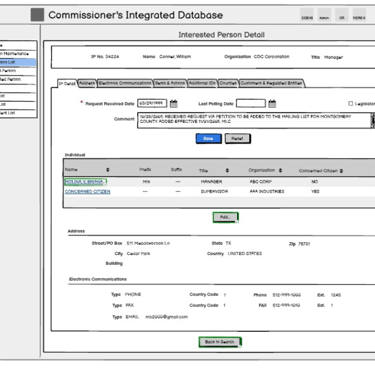
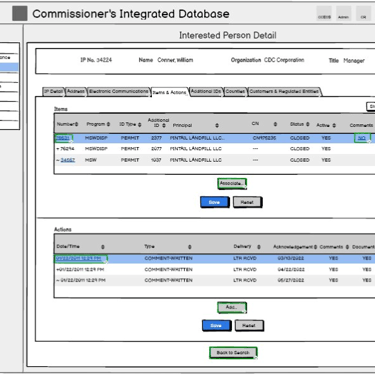
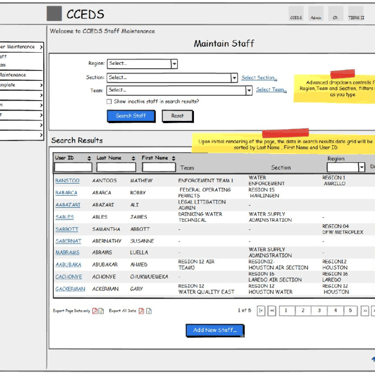
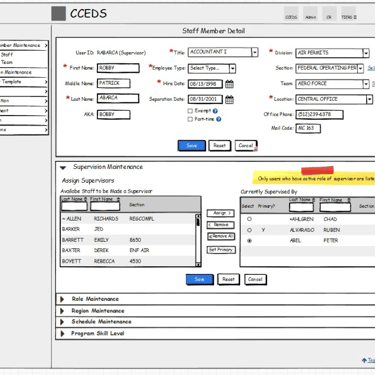

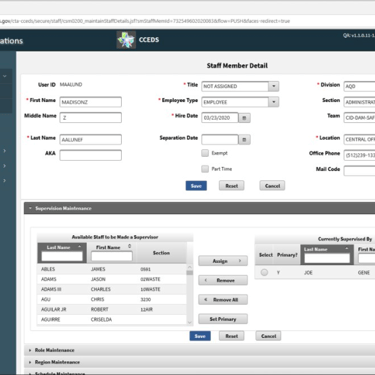
Legacy workflows consolidated into fewer, more intuitive screens. Consistent layout patterns reduce learning curve across modules. Reduced pop-up usage improves task continuity
Validation & Iteration
Designs were validated through:
Iterative reviews with end users
Ongoing collaboration with development teams
Usability feedback incorporated across design cycles
The redesign emphasized progressive improvement, allowing users to adapt without disruption.
Outcome
Reduced screen count across major workflows
Improved usability and consistency across applications
Lowered training burden for new and existing users
Established UX standards reusable across future TCEQ systems
The redesigned applications were well received by both TCEQ stakeholders and end users
Reflection
Large-scale government systems demand restraint as much as creativity.
This project reinforced the value of designing within constraints—improving usability while respecting regulation, legacy, and user familiarity.